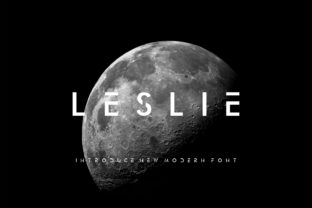
Leslie: A Modern Display Font with a Futuristic Edge
There’s a moment in every branding project where you open a blank brand board and feel the weight of the task ahead. For me, that moment came recently while working on a boutique identity for a local coffee shop. I needed a font that would capture the essence of modernity and innovation—something that felt fresh, yet still grounded in a real-world application. That’s when I reached for Leslie.
A Font That Speaks to the Future
Leslie is a display font with a strong personality. It’s modern, smart, and carries a distinct futuristic vibe that makes it stand out from the usual suspects. The letterforms are clean and geometric, but with subtle curves that give them a sense of motion and energy. It’s not just about looking good—it’s about feeling forward-thinking and relevant.
What really caught my eye was how Leslie balances simplicity with sophistication. The contrast between its sharp edges and soft transitions creates a visual rhythm that feels dynamic. It’s the kind of font that can carry a logo with confidence, whether it’s printed on a business card or displayed on a digital screen.
Testing Leslie in Real Branding Work
I first tested Leslie on a logo concept for the coffee shop. I paired it with a minimalist sans-serif typeface to create a contrast that felt balanced and intentional. The result was a logo that felt both contemporary and approachable. Leslie worked well as the headline font, drawing the eye without overwhelming the design.
As I moved into the brand board, I used Leslie for headlines, taglines, and key visual elements. Its futuristic feel made it ideal for a brand that wanted to communicate innovation and quality. I also experimented with using Leslie on packaging mockups, and it held up well against the textures and colors of the product. It added a touch of elegance without overpowering the design.
One of the things I appreciated most about Leslie was its versatility. It performed well in different contexts—from social media graphics to web design elements. On an Instagram post, Leslie looked crisp and legible, even at smaller sizes. On a website header, it created a strong visual anchor that helped guide the user’s attention.
When to Use Leslie and When Not To
Leslie is best suited for display purposes. It shines in headlines, logos, and short phrases where impact matters more than readability. However, it’s not the best choice for long body text or formal corporate use. At smaller sizes, some of the finer details can become less legible, which might be a concern for print-on-demand products or extensive editorial content.
If you’re looking for a font that can elevate your brand’s visual identity without sacrificing clarity, Leslie is a solid choice. But if your project requires a lot of body text or a more traditional aesthetic, you might want to consider pairing it with a more readable serif or sans-serif font.
Font Pairing and Design Considerations
Leslie pairs well with a variety of other fonts, depending on the desired effect. For a modern, tech-forward look, I’ve paired it with a sleek sans-serif like Montserrat or Inter. For a more artistic feel, I’ve combined it with a script or handwritten font to add warmth and personality.
It’s also worth noting that Leslie comes with several weights and styles, including alternates and ligatures, which can add depth and character to your designs. These features make it easier to create visual interest without relying solely on the main font.
Before using Leslie in final client work, I always recommend testing it in different formats and sizes. Check how it looks on a shop sign, product label, or printed card. This helps ensure that it maintains its impact across all mediums.
Commercial Use and Licensing
Like any premium font, Leslie comes with specific licensing terms that must be respected. Before using it in client projects, packaging, websites, or print-on-demand products, make sure you understand the commercial use rights. Always check the license agreement to avoid any potential issues down the line.
Leslie is a great example of a modern typography system that can enhance your creative workflow. Whether you’re designing a logo, a brand identity, or a social media layout, it has the potential to make your work stand out. Just remember to use it wisely and pair it thoughtfully with other fonts to create a cohesive and impactful design.